How to recover deleted Wechat chat history (messages) - Cok Wechat Recovery

This software is to help to export and recover WeChat chat history, which could export WeChat chat history from all smart phones (including Android system and IOS system). You just need to export the folder of WeChat chat history to computer and open this software to view (it could also recover carelessly deleted WeChat chat history in your own iPhone) all the chat contents such as word messages, voice messages, pictures, sights, etc. As for the method to export the folder of WeChat chat history to computer, please click the link on the bottom of this website.
Usage steps of Cok Wechat Recovery:
1. To copy WeChat chat history in the phone to computer. You could click the interlinkage below to know more about steps in detail.
iPhone: How to export and recover WeChat chat history from iPhone Video Guide
Android phone: How to export WeChat chat history in Android phone to computer
Windows PC: How to Export Messages from Wechat for Windows
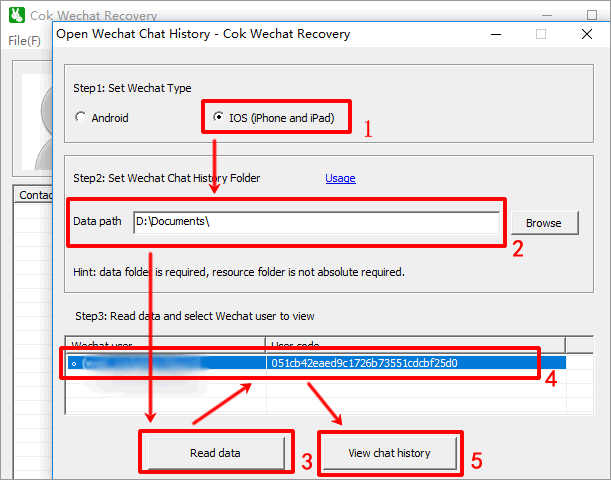
2. Open “Cok Wechat Recovery”, choose WeChat type, set up data path, click “Read data” button and the software would read all WeChat ID in the target folder for you, then click the WeChat ID that you want to view and click the "view chat history" button.
iPhone: Set data path as the exported "Documents" folder
Android phone: Set data path as the exported "data MicroMsg" folder, the resource path as the exported "resource MicroMsg" folder.
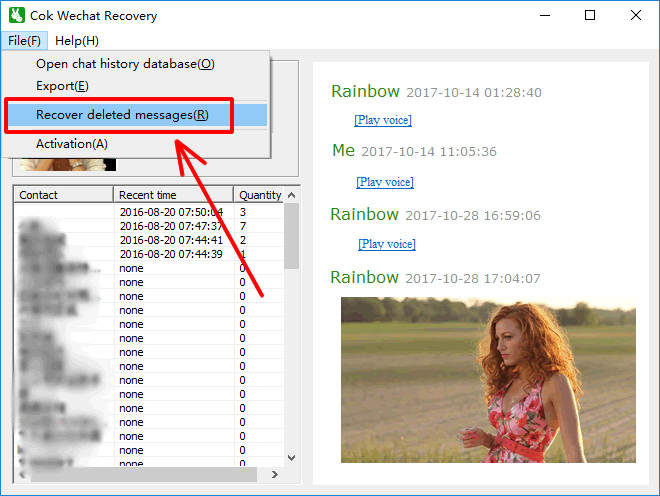
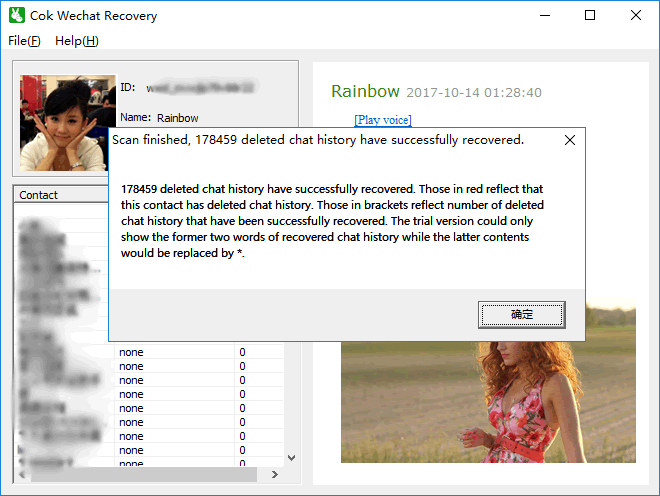
3. This software could also recover the deleted WeChat chat history (messages) in iPhone. You just need to click "File", "Recover deleted messages" menu. FAQ: About Chinese Characters
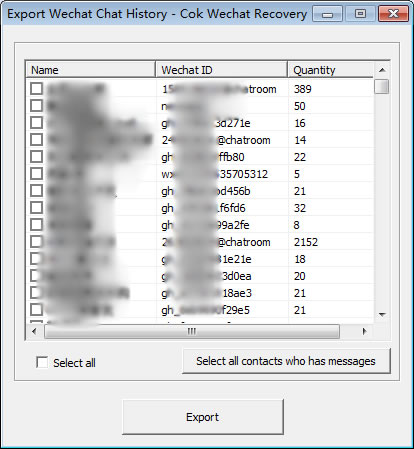
4. You could also export WeChat chat history as html file, and thus at next time, you could view it without opening this software. If you want to export it as external file, please click“file” -> “export” menu, choose the WeChat contact that you want to export his/her chat history. The interface is like this:
Recovery principle: After the WeChat chatting records are deleted, the block data in the file are not deleted immediately. Only when there are new messages would new data randomly cover those deleted block data. If the deleted block data are not covered by new data, they could be entirely recovered.