How to Recover Deleted WhatsApp Messages from Android Phone
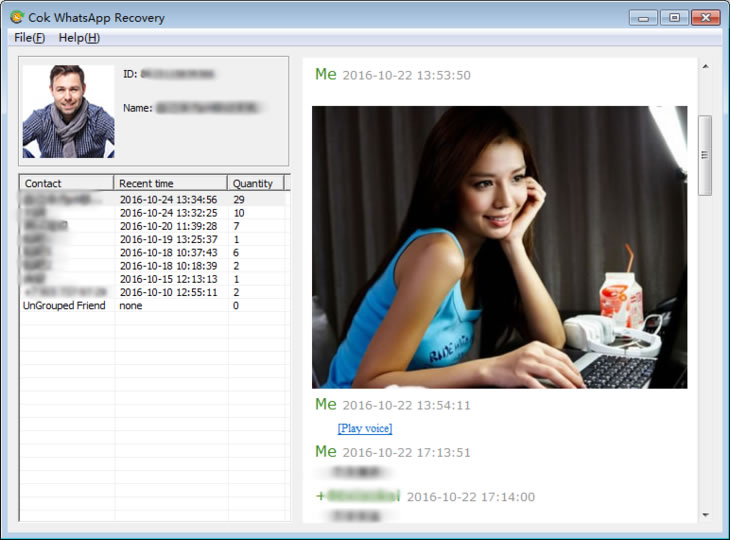
Cok WhatsApp Recovery can export Android WhatsApp Messages (including some deleted messages) to computer for viewing. It supports all Android phones including SANSUNG, HUAWEI, MI, LG, Motorola, HTC, etc. In order to export the WhatsApp Messages to your computer, you need to root your android device at first, and then copy "com.whatsapp" folder to your computer for viewing.
Usage of Cok WhatsApp Recovery for Android Phones:
Step 1: Do root to your Android phone at first. There are many free one click android root software in the internet, such as "KinGoRoot" (Download Now).
Step 2: Download and install "rootexplorer" app in the Android phone.
Step3: Open the “rootexplorer” app, enter "data\data\" path, check "com.whatsapp" folder and then click the “copy” button in left bottom cornor. Then click "STORAGE" tab, and click "COPY HERE" button.

Step 4: Connect the Android phone to computer, open the phone drive, copy and paste the "com.whatsapp" folder to any folder of your computer.

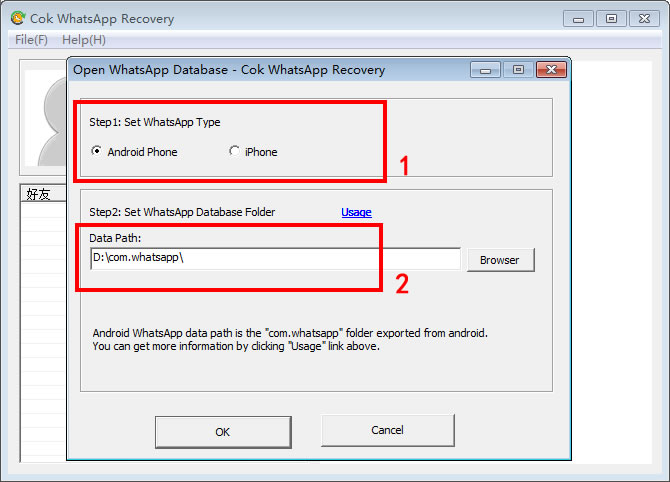
Step 5: Download and open "Cok WhatsApp Recovery" software, set WhatsApp type as "Android Phone", set the data path as the former exported "com.whatsapp" folder, then click "OK" button directly.
Step 6: Now, we could view all the WhatsApp messages (including some deleted WhatsApp messages) in Android phone on the software interface: